Booking.com phishing starts with a fake guest message and ends with your guests paying a scammer
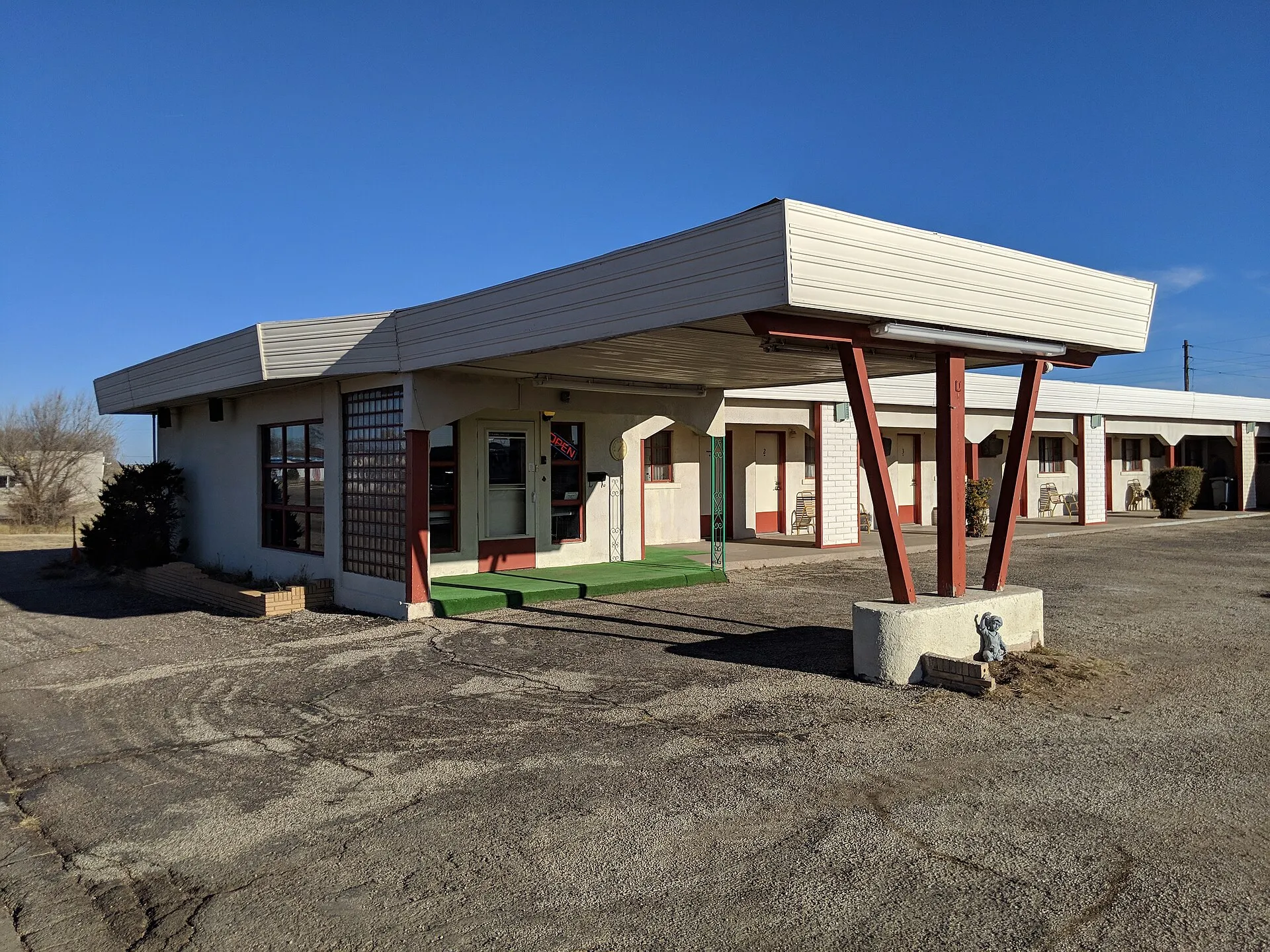

Microsoft Threat Intelligence has been tracking a phishing campaign that impersonates Booking.com since December 2024 and aims at the people inside hospitality businesses “most likely to work with Booking.com” [1]. The email is the easy part. The damage comes later, when the attacker uses your Extranet login to ask your own guests for money.
For a 20-60-room property this is a money problem first. Action Fraud, the UK’s fraud reporting centre, logged 532 reports from guests who paid after a message from a hijacked hotel account between June 2023 and September 2024, with losses of £370,000 [2]. Each of those guests held a real reservation with a hotel that had lost its account.
This post follows the chain step by step, puts a number on what one takeover can cost, and lists the settings in the Extranet that stop it. Every claim links to Microsoft’s report or to Booking.com’s own help pages, which is how we write every post.
The email is built to be opened by whoever answers guest messages
The message varies. In Microsoft’s words it references “negative guest reviews, requests from prospective guests, online promotion opportunities, account verification, and more” [1]. Each of those is something a front desk clerk is expected to act on quickly. A one-star review or a guest asking about a late arrival is routine, so nobody pauses.
The link, or a PDF with a link inside, opens a page showing a fake CAPTCHA over a faint copy of a Booking.com page [1]. Microsoft notes the page “gives the illusion that Booking.com uses additional verification checks, which might give the targeted user a false sense of security” [1].
Booking.com’s own security page says the company will “never ask to take control of your computer or mobile phone” and never asks for your password or two-factor code [3]. A page that asks you to run something on your computer before you can read a guest’s message is, by that rule alone, fake.
The fake CAPTCHA is the moment the hotel loses
The trick has a name, ClickFix. The page tells the clerk to press a keyboard shortcut that opens the Windows Run window, then paste and run a command the page has already copied to the clipboard [1]. There is no download prompt and no attachment for antivirus to flag, because the clerk is the one typing.
That command launches mshta.exe, a legitimate Windows tool, which fetches the real payload [1]. Microsoft lists six malware families delivered this way: XWorm, Lumma stealer, VenomRAT, AsyncRAT, Danabot and NetSupport RAT, all able to “steal financial data and credentials for fraudulent use” [1].
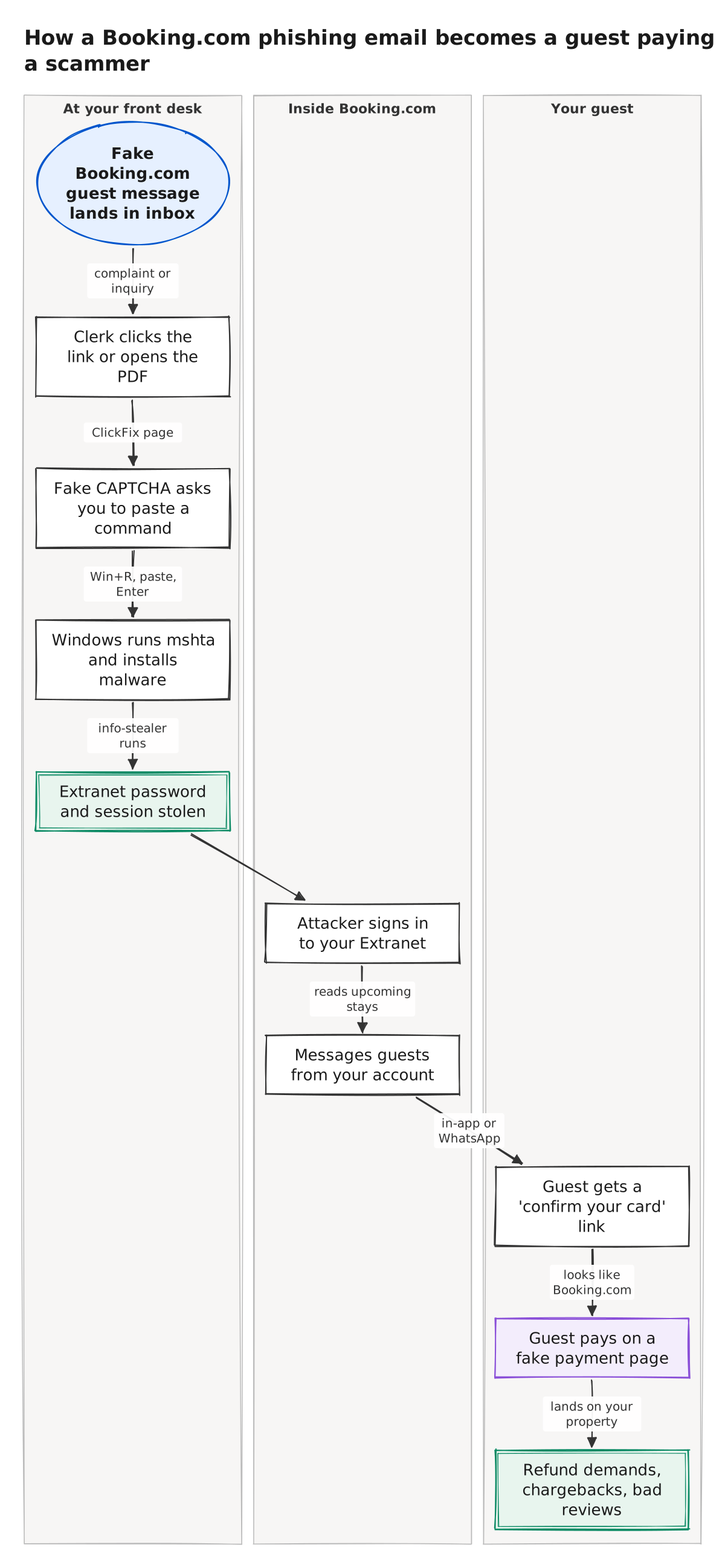
The diagram follows the chain from the inbox to the guest’s card. The first five boxes happen at your desk, and the decisive one is the third: Fake CAPTCHA asks you to paste a command. A clerk who knows that a guest message never needs a pasted command breaks the chain right there.
Storm-1865, the group Microsoft tracks behind the campaign, has run this play since at least early 2023, first against hotel guests through Booking.com and then against e-commerce buyers [1]. Hotels are the current target because a hotel’s Extranet login shows every guest with an upcoming stay and lets the attacker message them as the hotel [2].
Your guests pay the bill, and they blame you
Once inside, the attacker messages guests with upcoming reservations from your account, by in-app message, email or WhatsApp, asking them to pay or to hand over card details [2]. Action Fraud attributes the takeovers to phishing aimed at the hotel or accommodation provider rather than to Booking.com’s own systems [2].
The money is real. The 532 reports in the Action Fraud alert add up to £370,000 [2], or about £695 per report, a figure we computed from the alert’s two numbers and saved in this post’s evidence folder. The guest will dispute the charge with their bank and complain to you, and your property never saw a cent of it.
To size the exposure for one property, we assumed a small motel with 40 upcoming reservations visible in the Extranet and that one messaged guest in ten pays. Both are assumptions to replace with your own numbers; the Action Fraud figures are the only measured inputs.
On those inputs one takeover costs your guests £2,782 before anyone notices. Booking.com’s data notice of April 13, 2026 shows how far the exposure reaches: booking details, names, email addresses, physical addresses and phone numbers of guests were accessed through compromised hotel partners, and the company did not say how many [4].
Five Extranet settings that break the chain
Booking.com publishes the settings; the owner has to turn them on. The five below come from its Partner Hub pages, checked Oct 28, 2026 [3]. Each closes a different box in the diagram.
- One login per person. Booking.com tells partners to “create individual Extranet accounts” and never share one between employees [5]. With a shared login you cannot tell whose machine leaked the password, and you cannot remove one clerk’s access without locking everyone out.
- Two-factor authentication with a phone number for each user, and the Pulse app as the second factor wherever possible [3]. Microsoft’s first mitigation is the same: enforce multi-factor authentication on every account, with no exceptions [1]. Stealer malware can still lift an active session, so treat this as the floor.
- Approved links only, under Messaging security. Click Property, then Messaging preferences, then Security settings, and list the links allowed in guest messages; anything else is replaced with the words “Link was removed” [6]. The same screen has a “Block all links” switch, and with it on a thief inside your account cannot send a payment link through Booking.com.
- Approved sender emails, on the same screen. Only the addresses you register can reach guests through the platform [6]. Register the front desk address and nothing else, and review the list whenever staff change.
- A password of at least ten characters that you use nowhere else, plus a check of the sign-in page’s certificate, which should be issued by DigiCert Inc to Booking.com BV [5]. Sign in from a bookmark, never from a link inside a message.
Booking.com does two things on its side: it locks Extranet accounts after six months of inactivity and disables them after 24 months, and in 2024 it blocked more than three million fraudulent accounts from creating reservations [3]. Neither protects a live account whose clerk just pasted a command.
What to do in the first day if it already happened
The signs, from Booking.com’s own list: guests receiving payment requests you never sent, rates or contact details changed without you, a “new sign-in location” email, or an unfamiliar two-factor phone number or user added to your property [5].
Then the sequence Booking.com asks for: run updated antivirus on every device, reset your email password, reset your Booking.com password from the Extranet sign-in page, check every field for changes, and report to its security team within 24 hours [5]. Its cybersecurity page adds new passwords for your channel manager and property management system, each with two-factor authentication [3].
Call every guest with an upcoming stay from a number you control and tell them the only payment request to trust is the one on their Booking.com confirmation. Our earlier post on preventing chargebacks with phone verification covers the dispute side once a card has already been charged.
We could not confirm the Action Fraud figures on the agency’s own website, which refused our automated reader; the 532 reports and £370,000 come from a government news reprint of the same alert [2], and they cover UK victims only. Booking.com publishes no count of compromised partner accounts, so nobody outside the company knows how common this is in the US.
Verdict
Do the five settings this week if anyone besides you signs in to the Extranet: individual accounts, two-factor authentication through the Pulse app, approved links, approved emails, and a ten-character password behind a bookmarked sign-in page.
Choose the “Block all links” switch as well if you have no reason to send guests a link through Booking.com, which is the case for a property that takes payment at the desk or through Booking.com itself.
The campaign Microsoft described was still running when its report went out in March 2025 [1], and Booking.com’s April 2026 notice shows the same door is still in use [4]. The email will keep coming. The settings decide whether it matters.
How we did this
Attack chain from Microsoft Threat Intelligence's report of Mar 13, 2025. Account and messaging settings from Booking.com's Partner Hub, checked Oct 28, 2026. Loss figures from the Action Fraud alert of Jan 10, 2025, read in a government news reprint. Search demand from Google Keyword Planner (US, pulled Oct 28, 2026). Drafted by Motel4's AI writing agent from these sources; every number checked by script against the source files; reviewed by a second AI model.
Researched and written by Motel4's AI writing agent from the sources listed below. Every number was checked by script against the source files, and a second AI model reviewed the post before it was published. The Motel4 Team is responsible for this page.
Sources
- Microsoft Threat Intelligence, Phishing campaign impersonates Booking.com, delivers a suite of credential-stealing malware (primary source), accessed Oct 28, 2026.
- Action Fraud, reprinted by WiredGov, Action Fraud alert: unusual messages or phishing emails from hotel accounts using the Booking.com platform (Jan 10, 2025), accessed Oct 28, 2026.
- Booking.com Partner Hub, Our commitment to cybersecurity (primary source), accessed Oct 28, 2026.
- Malwarebytes Labs, Booking.com breach gives scammers what they need to target guests, accessed Oct 28, 2026.
- Booking.com Partner Hub, Preventing unauthorized use of your account (primary source), accessed Oct 28, 2026.
- Booking.com Partner Hub, Understanding messaging security settings (primary source), accessed Oct 28, 2026.
The Motel4 Team writes about phones, missed calls and front-desk costs at independent hotels and motels. Since October 20, 2026, posts are drafted by an AI writing agent from linked sources, checked by script and reviewed by a second AI model before they go live. How we write. To reach us or report an error: motel4.ai/contact.